This notebook shows a general example of mass balance calculation, we currently support two algorithms:
Non-negative algorithm, it solves KKT (Karush-Kuhn-Tucker) conditions for the non-negative least squares problem
Matrix decomposition, following Li et al. (2020) and Ghiorso 1983. The compositional matrix will be broken down by singular value decomposition, the coefficients will then calculated.
[1]:
# import python modules
import pandas as pd
import matplotlib.pyplot as plt
from massbalance.mb_tools import MassBalance
1. Define elements for calculation
We first need to define element list for mass balance calculation, special attention goes to FeO term, which we use FeO, not FeOt nor FeOtot, this is consistent with the input excel files. Feel free to change the order of the elements
[2]:
cmpnts = ['SiO2','Al2O3', 'TiO2', 'MgO', 'FeO', 'MnO', 'CaO', 'Na2O', 'K2O', 'P2O5', 'Cr2O3'] # change your desired elements for mass balance calculation
if you also want to integrate standard deviation on elements, this can be done manually or by the following line
[3]:
cmpnts_std =[x + '_std' for x in cmpnts]  # save columns for std
cmpnts_std
[3]:
['SiO2_std',
 'Al2O3_std',
 'TiO2_std',
 'MgO_std',
 'FeO_std',
 'MnO_std',
 'CaO_std',
 'Na2O_std',
 'K2O_std',
 'P2O5_std',
 'Cr2O3_std']
2. Load data
The easist way is to copy paste data in the input excel file, please also check README file for details of data prepration
[4]:
nat_comp = pd.ExcelFile("input_comp.xlsx")
We load the whole excel spreadsheet to a pandas ExcelFile, to access data in your spreadsheet, you can do so by looping through ExcelFile to a dictionary:
[5]:
nat_dict = {}  # create dictionary to collect compositions of different phases
nat_phases = []  # create list to save all phases in the calculation. Note bulk will be the bulk compsition, run_index will be your sample number, or rock id . etc
for sheet_name in nat_comp.sheet_names:
    nat_phases.append(sheet_name)
    nat_dict[sheet_name] = nat_comp.parse(sheet_name)
nat_phases stores the sheet names, nat_dict stores the data of each sheet.
[6]:
nat_phases
[6]:
['gl', 'ol', 'sp', 'py', 'pureFe', 'pureNa', 'bulk', 'run_index']
Use the sheet name to access data, let’s what we have in the gl phase
[7]:
nat_dict['gl'].head()
[7]:
| Run_no | SiO2 | Al2O3 | P2O5 | CaO | FeO | Na2O | MgO | TiO2 | K2O | ... | Al2O3_std | P2O5_std | CaO_std | FeO_std | Na2O_std | MgO_std | TiO2_std | K2O_std | MnO_std | Cr2O3_std | |
|---|---|---|---|---|---|---|---|---|---|---|---|---|---|---|---|---|---|---|---|---|---|
| 0 | 02As1 | 46.66 | 10.16 | 0.17 | 11.64 | 13.06 | 1.95 | 13.15 | 2.43 | 0.49 | ... | 0.17 | 0.10 | 0.22 | 0.34 | 0.10 | 0.26 | 0.20 | 0.04 | 0.04 | 0.04 |
| 1 | 01As1 | 46.96 | 10.34 | 0.20 | 11.81 | 13.21 | 1.84 | 12.16 | 2.53 | 0.44 | ... | 0.11 | 0.07 | 0.20 | 0.21 | 0.10 | 0.12 | 0.14 | 0.05 | 0.03 | 0.08 |
| 2 | 04As1 | 47.20 | 10.80 | 0.23 | 12.13 | 12.77 | 1.87 | 11.04 | 2.65 | 0.48 | ... | 0.11 | 0.05 | 0.21 | 0.45 | 0.14 | 0.09 | 0.16 | 0.05 | 0.05 | 0.03 |
| 3 | 03As1 | 48.38 | 11.36 | 0.18 | 12.63 | 13.03 | 1.42 | 10.35 | 2.54 | 0.43 | ... | 0.16 | 0.06 | 0.12 | 0.27 | 0.07 | 0.19 | 0.27 | 0.05 | 0.05 | 0.05 |
| 4 | 05As1 | 47.18 | 11.63 | 0.23 | 12.84 | 12.57 | 2.04 | 9.42 | 2.60 | 0.51 | ... | 0.12 | 0.05 | 0.25 | 0.20 | 0.12 | 0.18 | 0.23 | 0.05 | 0.04 | 0.05 |
5 rows × 25 columns
we use run_index sheet to store all runs we wish to perform mass balance with, we can check by doing:
[8]:
nat_dict['run_index']
[8]:
| Run_no | T_C | fO2 | |
|---|---|---|---|
| 0 | 02As1 | 1320 | QFM |
| 1 | 01As1 | 1302 | QFM |
| 2 | 04As1 | 1280 | QFM |
| 3 | 03As1 | 1260 | QFM |
| 4 | 05As1 | 1240 | QFM |
| 5 | 06As1 | 1200 | QFM |
| 6 | 15As1 | 1180 | QFM |
| 7 | 17As1 | 1170 | QFM |
| 8 | 14As1 | 1160 | QFM |
3. Mass balance calculation with MCMC progagting errors
MassBalance class does the core calculation. To start the calculation, we need to define the MassBalance class by passing all necessary infos for calculations: 1. input_comp – load the ExcelFile variable 2. comp_col – load element list 3. comp_std_col – load element std list (if avaiable), default is None 4. match_column – this is the column name that saves your expts run no., sample no., or rock id. in each spreadsheet 5. bulk_sheet – sheet name of which
saves bulk composition(s) 6. index_sheet – sheet name stores entire infos about expts run numbers ± condition, sample numbers or rock id. 7. normalize – normalize your data to 100 during calculation, default is True
[9]:
mb_cal = MassBalance(
    input_comp=nat_comp,
    comp_col=cmpnts,
    comp_std_col=cmpnts_std,
    match_column="Run_no",
    bulk_sheet="bulk",
    index_sheet="run_index",
    normalize=True,
)
mb_cal is a variable we create for mass balance calculation The calculation is done by calling the compute method in the MassBalance class as mb_cal.compute() Four parameters can be tuned during computing: 1. mc – define the number of MC calculations, the default is None, which will be a one time calculation 2. exportFiles – we can export the results to excel file output.xlsx and output_mean_median_std.xlsx. If mc is given,
output_mean_median_std.xlsxstores statistical infos for mc results 3. batch_bulk: define if you have different bulk for each group of phases, this is useful for layers in layered intrusions or expts with variable starting compositions for different runs. If you only have one bulk composition, can turn it to False 4. method: use nnl for non-negative method, svd for matrix decomposition method
Below we give examples to perform 100 times MC calculation with non-negative method, export files, and we have pre-defined a batch bulk composition in the input file. More examples are given in the python scipt along with this code
[10]:
res_dict = mb_cal.compute(mc=100, exportFiles=True, batch_bulk=True, method='nnl')
The result is saved in a python dictionary, with each key responses to the expts run no., sample no, or rock id you defined in the index sheet Let’s take a look the results of first experimental run 02As1
[11]:
res_02As1 = res_dict['02As1']
res_02As1
[11]:
| gl | ol | sp | py | pureFe | pureNa | r2 | residues | |
|---|---|---|---|---|---|---|---|---|
| 0 | 0.980309 | 0.025299 | 0.0 | 0.0 | 0.0 | 0.000665 | 0.318216 | 0.101261 |
| 1 | 0.959695 | 0.031032 | 0.0 | 0.0 | 0.0 | 0.001112 | 1.174406 | 1.379230 |
| 2 | 0.979235 | 0.019375 | 0.0 | 0.0 | 0.0 | 0.002412 | 1.023295 | 1.047133 |
| 3 | 0.981838 | 0.011746 | 0.0 | 0.0 | 0.0 | 0.001503 | 0.629961 | 0.396851 |
| 4 | 0.968629 | 0.035022 | 0.0 | 0.0 | 0.0 | 0.000457 | 0.707438 | 0.500469 |
| ... | ... | ... | ... | ... | ... | ... | ... | ... |
| 95 | 0.981687 | 0.022148 | 0.0 | 0.0 | 0.0 | 0.000000 | 1.030632 | 1.062203 |
| 96 | 0.980176 | 0.015765 | 0.0 | 0.0 | 0.0 | 0.000000 | 0.661183 | 0.437163 |
| 97 | 0.980972 | 0.025854 | 0.0 | 0.0 | 0.0 | 0.001035 | 0.950629 | 0.903696 |
| 98 | 0.974249 | 0.021821 | 0.0 | 0.0 | 0.0 | 0.000774 | 1.953085 | 3.814540 |
| 99 | 0.993793 | 0.003956 | 0.0 | 0.0 | 0.0 | 0.000000 | 0.733781 | 0.538435 |
100 rows × 8 columns
This is the MC results (100 times), to calculate statistical infos, you can simply call the built-in pandas functions as:
[12]:
res_02As1.describe()
[12]:
| gl | ol | sp | py | pureFe | pureNa | r2 | residues | |
|---|---|---|---|---|---|---|---|---|
| count | 100.000000 | 100.000000 | 100.0 | 100.0 | 100.000000 | 100.000000 | 100.000000 | 100.000000 |
| mean | 0.981366 | 0.020590 | 0.0 | 0.0 | 0.000010 | 0.000551 | 0.876400 | 0.870697 |
| std | 0.009831 | 0.007873 | 0.0 | 0.0 | 0.000092 | 0.000666 | 0.321958 | 0.630622 |
| min | 0.957179 | 0.000337 | 0.0 | 0.0 | 0.000000 | 0.000000 | 0.275481 | 0.075890 |
| 25% | 0.976014 | 0.015349 | 0.0 | 0.0 | 0.000000 | 0.000000 | 0.663642 | 0.440423 |
| 50% | 0.981365 | 0.020979 | 0.0 | 0.0 | 0.000000 | 0.000344 | 0.812141 | 0.660398 |
| 75% | 0.985775 | 0.025433 | 0.0 | 0.0 | 0.000000 | 0.000914 | 1.063028 | 1.130062 |
| max | 1.012758 | 0.042551 | 0.0 | 0.0 | 0.000910 | 0.002896 | 1.953085 | 3.814540 |
or only interested parameters
[13]:
res_02As1.agg(['mean', 'median', 'std'])
[13]:
| gl | ol | sp | py | pureFe | pureNa | r2 | residues | |
|---|---|---|---|---|---|---|---|---|
| mean | 0.981366 | 0.020590 | 0.0 | 0.0 | 0.000010 | 0.000551 | 0.876400 | 0.870697 |
| median | 0.981365 | 0.020979 | 0.0 | 0.0 | 0.000000 | 0.000344 | 0.812141 | 0.660398 |
| std | 0.009831 | 0.007873 | 0.0 | 0.0 | 0.000092 | 0.000666 | 0.321958 | 0.630622 |
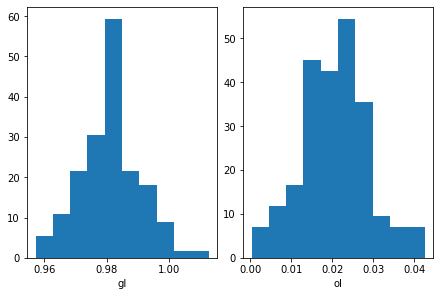
To plot the result, you can simply do:
[14]:
fig, axes = plt.subplots(1,2, constrained_layout=True)
axes[0].hist(res_02As1['gl'], density=True)
axes[1].hist(res_02As1['ol'], density=True)
axes[0].set_xlabel('gl')
axes[1].set_xlabel('ol')
plt.show()
We pre-defined pure FeO and pure Na2O phases as the evaluation of Fe loss and Na loss, if you don’t want to check this, simply delete these sheets Below we give an example to calculate Fe loss (%) and Na loss (%) in the first experimental run 02As1
[15]:
nat_bulk = nat_dict['bulk'].set_index('Run_no')
nat_bulk.loc['02As1', 'FeO']
[15]:
12.42
[16]:
nat_bulk.loc['02As1', 'Na2O']
[16]:
1.96
[17]:
res_02As1['Fe_loss'] = res_02As1['pureFe'] / nat_bulk.loc['02As1', 'FeO'] * 100 * 100
res_02As1['Fe_loss'].agg(['mean', 'median', 'std'])
[17]:
mean      0.008275
median    0.000000
std       0.073758
Name: Fe_loss, dtype: float64
[18]:
res_02As1['Na2O_loss'] = res_02As1['pureNa'] / nat_bulk.loc['02As1', 'Na2O'] * 100 * 100
res_02As1['Na2O_loss'].agg(['mean', 'median', 'std'])
[18]:
mean      2.813345
median    1.756814
std       3.398196
Name: Na2O_loss, dtype: float64
Fin ~ happy coding!